Platform
Everything between the survey and the invoice.
Siteproof is one system for the office, the field and the commercial team. This page describes it as it works today, including the parts that need a connection and the things it does not do yet.
Contracts
Set a contract up once, on one page.
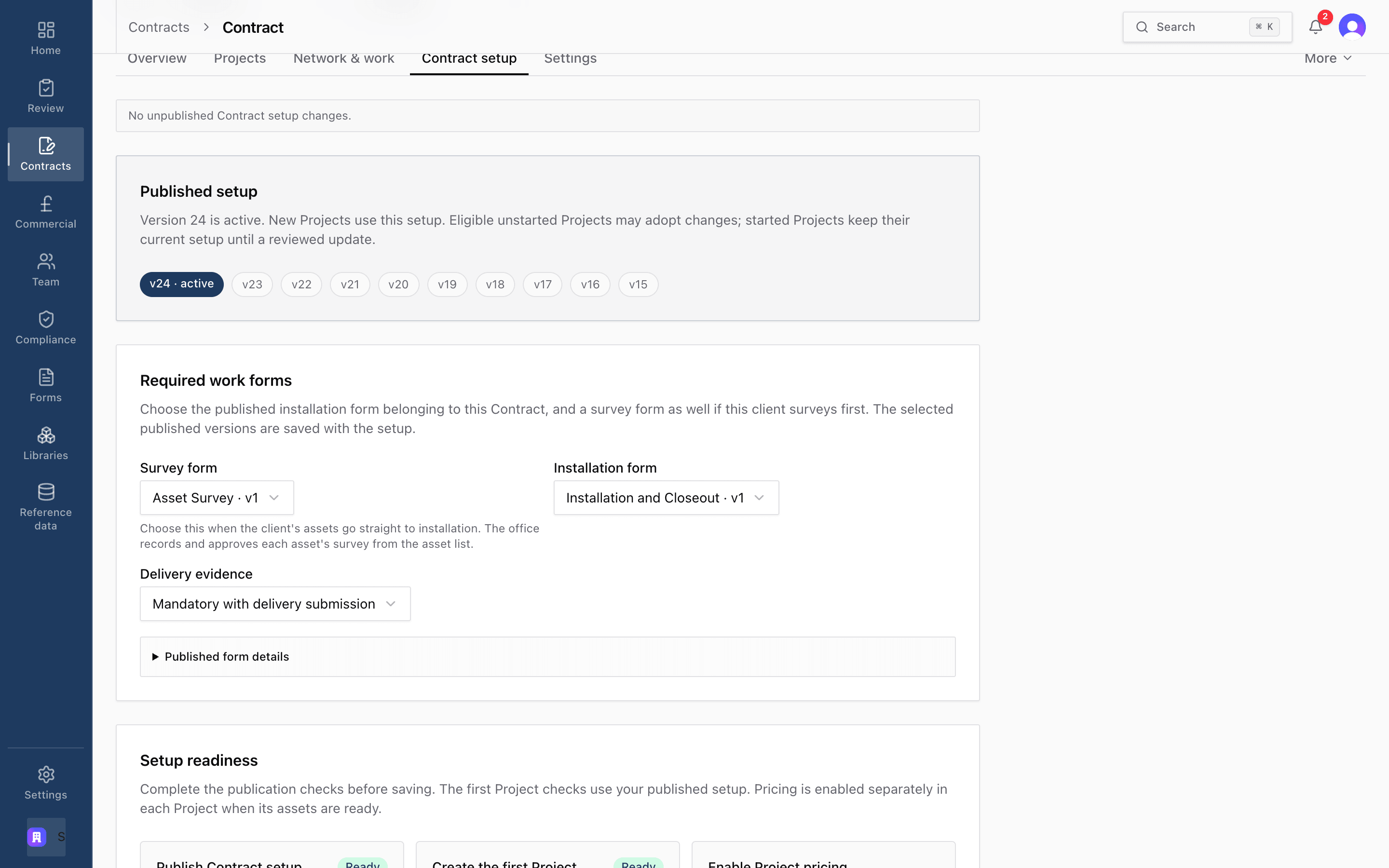
Details, setup questions, map data, forms and rates are answered on a single page. A contract needs its name, its forms and at least one rate. Each rate carries its code, unit, price and the materials it uses.
- Schedule of rates in GBP or EUR, imported from a spreadsheet or built in place
- Setup is published as numbered versions. New Projects take the active one; started Projects keep theirs until you review an update
- Choose the survey and installation forms, and whether delivery evidence is mandatory
- Shared organisation rate libraries, usable on every contract

Contract changes never rewrite live work.
Every published setup is locked by the database. A Project records the version it started on, so editing a contract on Tuesday cannot silently change the rules for work that began on Monday.
Maps and networks
The published network, under your own work.
The contract map combines the publisher's network, topology Siteproof derives from it, and your private work on top. Project maps reuse the same network beneath Project assets.
Network features stay read-only. Turning one into work, matching client references to it, or drawing Project geometry are explicit steps a person takes. Each match records who made it against the exact publisher revision on screen.
- Poles, substations and LV, HV and EHV overhead lines from the network operator's published open data
- Select a pole or pole-to-pole sections on the map to create work items
- Import a client's work release by spreadsheet, check how each column was read, then match it to the network
- Street, satellite, imagery and topographic base maps, with address and postcode search

Poles, lines and substations shown are Northern Powergrid's published open network data. Supported by Northern Powergrid Open Data. This does not imply any endorsement by Northern Powergrid.
Field app
Built for sites with no signal.
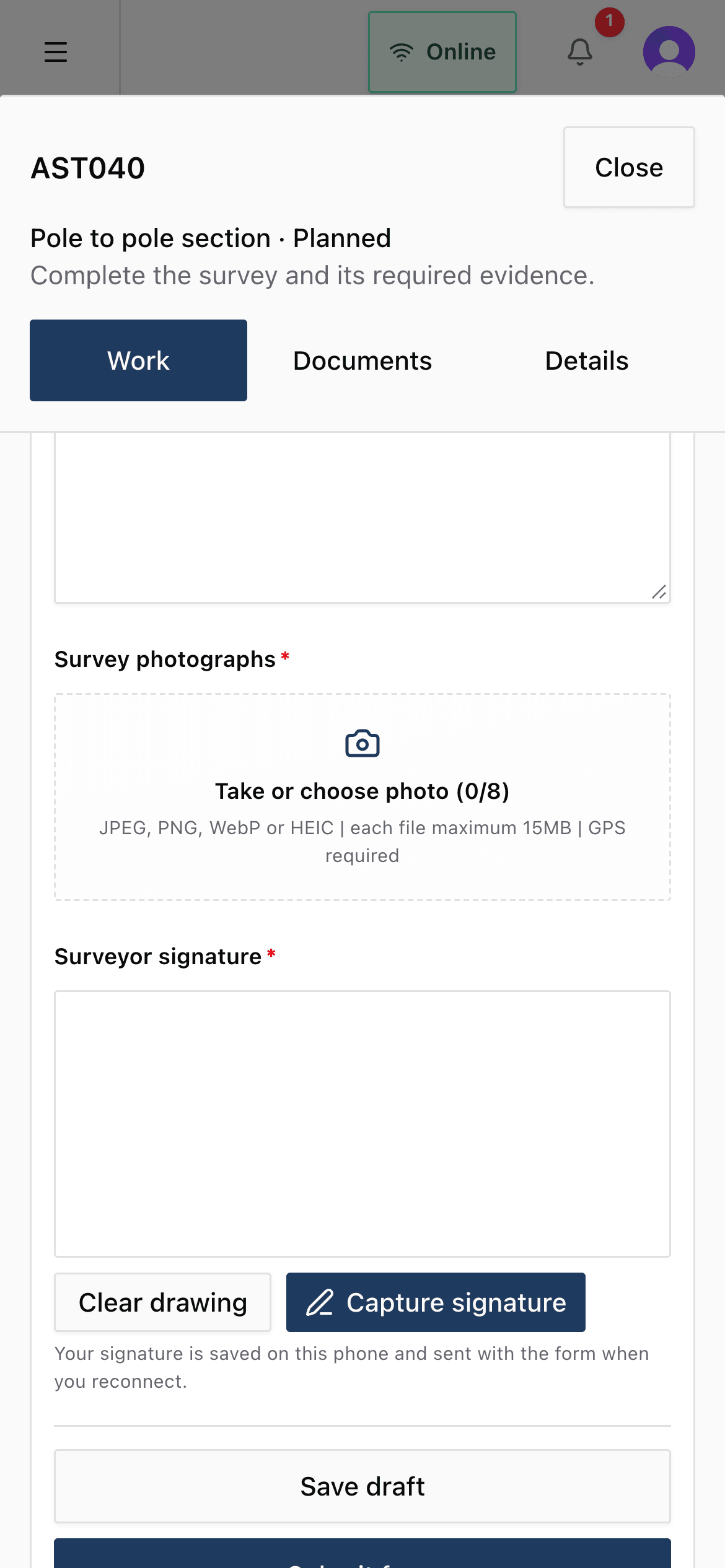
Accepting a Project starts the download, and it refreshes whenever the Project opens with a connection. The same map-first screen runs online and offline, so crews do not switch modes.
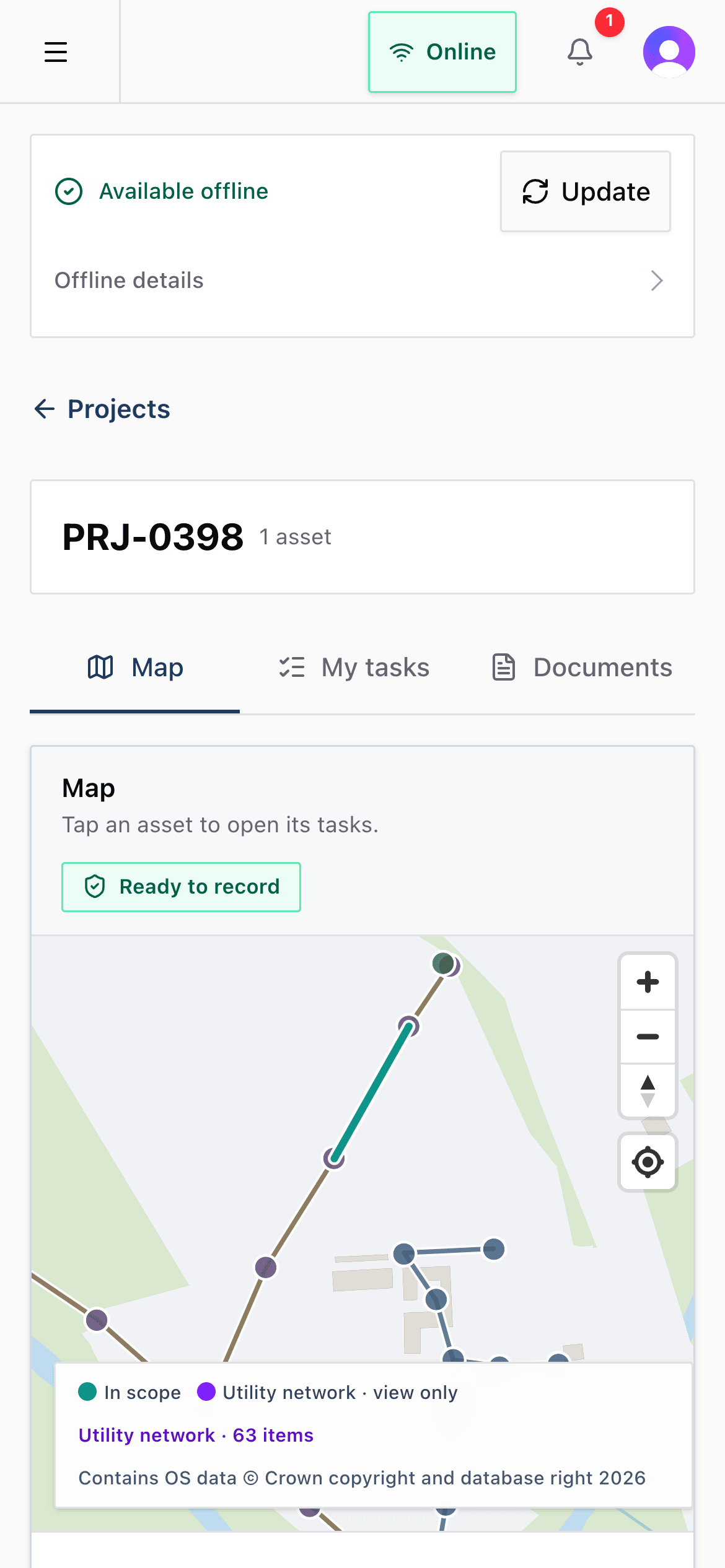
Poles, lines and substations shown are Northern Powergrid's published open network data. Supported by Northern Powergrid Open Data. This does not imply any endorsement by Northern Powergrid.
Works offline
- The Project map, drawings and documents
- Licensed network data for the Project area
- Each asset's task sheet, forms and rates
- Photos, signatures and GPS fixes
- Work required and work completed blocks
- New poles and spans drawn on site
- Status changes and journey taps
- The site-arrival risk assessment
Needs a connection
- Accepting newly assigned Projects
- Street and satellite base maps, and address search
- Chat and requests for inspection
- The in-app help assistant
- Office review and acceptance
Nothing applied twice
Every queued change carries its own identity, and the server's receipt stops a retried send from being applied twice.
Conflicts are shown, not guessed
If the office changed something while a device was offline, the user sees both versions and chooses.
Unsent work is kept
A dropped connection or a lapsed session never deletes work that has not reached the server.
Forms
Forms that create the work, not just describe it.
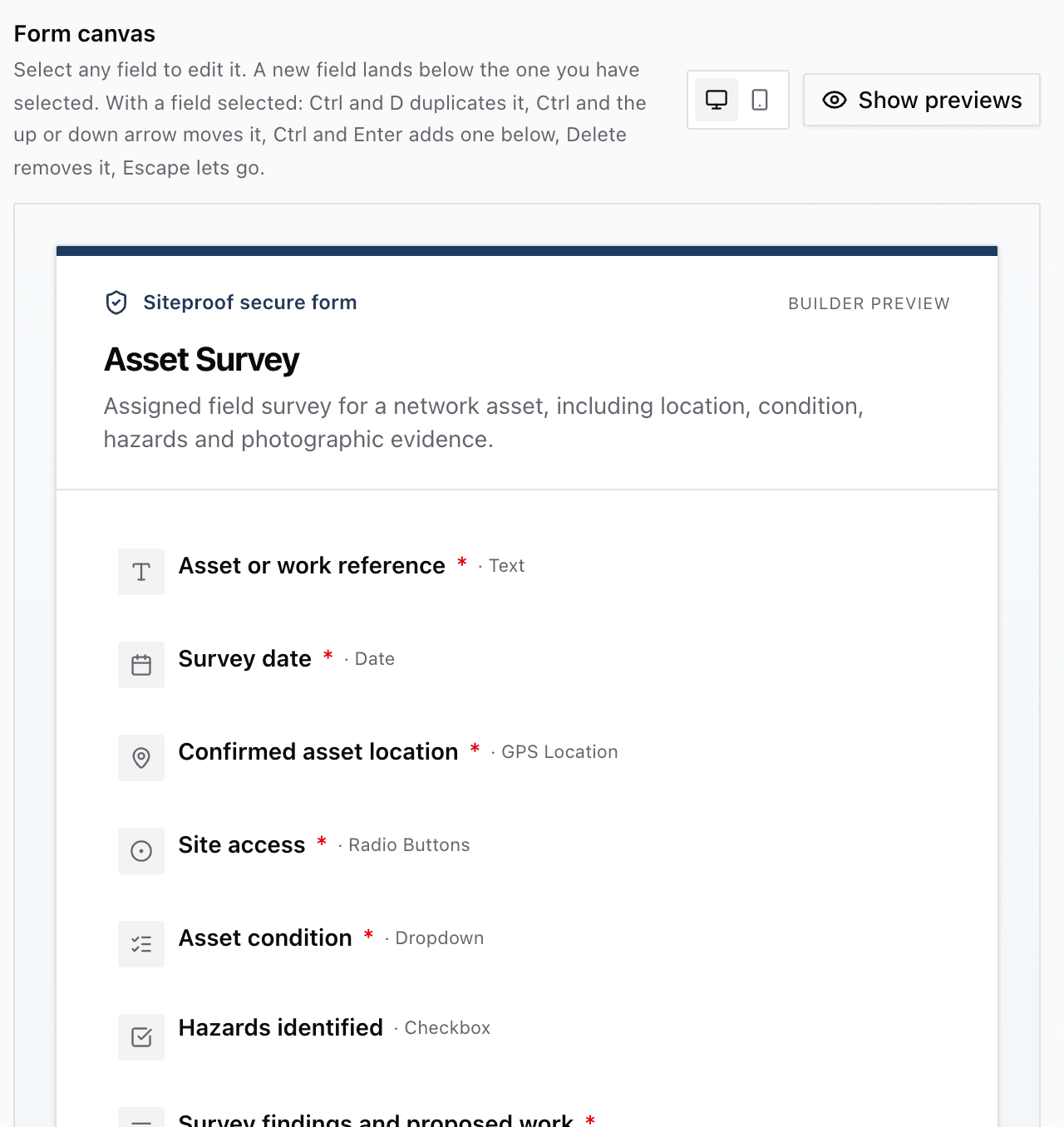
Build forms in the browser and publish them as locked versions. The office can pin a form to a pole, span or cable, and field users can choose from the library for their own assets. Answers are never shared between assets, even when the template is.
- 27 field types: text, numbers, dates, choices, photos, files, signatures, GPS location, barcodes, meter readings, repeating groups
- Work required: surveyors add rates, quantities and materials from the contract's catalogue
- Work completed: installers record quantities and actual materials against their own allocation
- Share a form by link, open to anyone, behind a password, or for signed-in users only
Commercial
From quote to invoice, with nothing re-keyed.
Approved survey work is priced into a quote from the contract's rates. Record the client's PO against the quote lines, and the office is told the work is ready to install. Installers are then allocated rate by rate, from the map or the work list.
Installation submissions and office acceptance are append-only records: they are added to, never edited, and the database enforces it. Accepted quantities move into data review, payment application and invoice documents that are locked once issued.
- Quotes are locked versions. One client PO can cover several quotes
- Split a rate between installers and dates; move untouched work or the unrecorded rest of started work
- Net, tax and gross are checked on every document, and the same work cannot be billed twice
- Documents can be cancelled, reversed or superseded, but never quietly changed

Checks and compliance
Gates that hold, and registers that keep the record.
Enforced by the server
- A daily site-arrival risk assessment per field user, per Project, when you switch it on. Checked again when offline work syncs.
- Required forms and evidence before an asset is handed over.
- A materials check before a rate can be completed.
Recorded alongside
- Risk assessment templates, written by the office.
- Competency cards such as CSCS, EUSR, NRSWA and first aid, with expiry dates flagged on screen.
- Street works notices and reinstatements, kept as a register. Siteproof does not file with Street Manager.
Reporting
Read the same numbers the work produced.
Reports read the delivery and commercial records directly, so the office, the field and the commercial team are never comparing different spreadsheets.
Planned vs accepted
Every rate from proposed scope through authorised work to accepted quantity, partial acceptance included.
Delivery and commercial summary
Projects, assets, rate items and work status across a contract, with a CSV per Project.
Materials
Planned against confirmed material quantities.
Forecast
Scheduled quantities valued at PO rates, week by week.
Journeys
Time between each field user's status taps on site.
Portfolio
Value by contract, for whoever runs the business.
Also in the box
Installation-only contracts
For clients who survey themselves: the office records the survey and work goes straight to installation.
Surveys done before Siteproof
Record a completed survey with its rate items and photos, then approve it like any other.
Early warnings
Raise early warnings and compensation events against the Project they affect.
Checkpoints and closeout
Project checkpoints read asset progress, required forms, evidence and materials before closeout.
Two-person material decisions
Material decisions need a second person to approve them.
In-app help
An assistant answers how-to questions about Siteproof. It does not read your records or act on them.
Questions
Straight answers.
Something not covered here? Ask us.
Which networks does Siteproof work with?
One network operator's published open data today, covering the North East of England, Yorkshire and northern Lincolnshire: poles, substations and LV, HV and EHV overhead lines. If you work on another network, tell us which one. We would rather say that plainly than suggest coverage we do not have.
Can we use it for gas, water or telecoms work?
The survey to invoice workflow is not specific to electricity, and a contract can be set up as gas, water or telecoms with asset labels to match. What is electricity-only today is the published network map: there is no gas, water or telecoms network data yet, and Projects without network data are more limited. If that is your work, talk to us first and we will show you exactly what works now.
Does it work without signal?
Yes. Accepting a Project downloads it to the device, and survey and installation work can be recorded with no connection at all. Work stays on the device until the server confirms it. Accepting new Projects, chat and office review need a connection.
Do crews need to install an app?
No app store. Siteproof runs in the browser on iPad, phone or laptop. Adding it to the home screen opens it full screen like an app.
Can we bring our existing rates?
Yes. Import a schedule of rates from a spreadsheet (xlsx or csv), then add the materials each rate needs in Siteproof.
Where is our data, and who can see it?
The database and file storage are hosted in Ireland (AWS eu-west-1). Every request is checked against your organisation on the server, and photos and documents sit in private storage behind short-lived links.
What is not built yet?
Client log-ins, accounting integration, VAT rules (you enter the tax rate when issuing a document), retention and CIS. Quotes and the invoice report export as CSV, and the Installation Acceptance Report as a PDF. We will go through anything else you need in the demo.
Can our client log in and see progress?
Not yet. Today you share progress through exports: CSV reports and the Installation Acceptance Report as a PDF.
Does it connect to our accounting system?
Not today. Quotes and the invoice report export as CSV. Siteproof does not handle VAT rules, retention, CIS or credit notes.
See it with your own rates.
A 30 minute walkthrough on the real product: a survey, a quote, an allocation and an application, in the order your teams would do them. Bring a schedule of rates if you have one to hand.
Monday to Friday, 9am to 5pm UK time. Database and files hosted in Ireland. No app store needed.